
Contents
W251 is a distributor tool which will wipe the memory of the sensor and reset it to factory defaults.
What to do
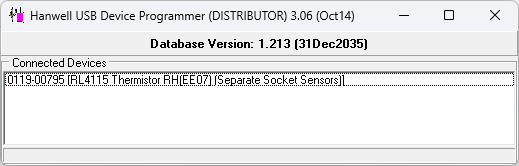
- Any Hanwell Pro 4000 sensor plugged into via USB cable to the computer will be listed in the main window.
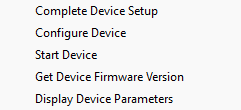
- Clicking on a device will provide a list of actions.
- Select "Complete Device Setup"
- Select "Configure Device"
- Select "Start Device"
- Unplug sensor from computer.
A Configure USB Device dialog box appears. Do not change any of the settings.
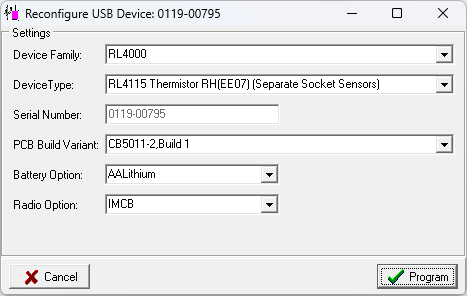
Click [Program]
Click [OK] on the confirm dialog box.
...and [OK] on the information dialog box.
ℹ️ You may experience a warning about the PCB Build. If that happen select one from the drop down list and click [Program]
In the Configure Device dialog box enter the correct Sensor ID and the desired TX Interval and click [OK]
...and [OK] on the information dialog box.
In the Information dialog box ... Click [OK]